


ADVANCED Excel Training - Online
Category
Work Processes
Pathway
Introduction to Administration
Audience
Anyone interested. This course is designed to take delegates with a good existing knowledge of Excel to the next level. It introduces some of the more frequently used functions, data analysis tools and data management tools.
Duration
3 hours - To ensure a positive experience for all attendees, delegates may not be admitted to the course if they arrive more than 10 minutes after the start time.
Delegate rate
Approximately £100 per day per delegate. Charges (paid by your authority) depend on how many delegates book.
To ensure a positive experience for all attendees, delegates may not be admitted to the course if they arrive more than 10 minutes after the start time.
IMPORTANT - You will need a current copy of Excel.
By “current” anything currently supported by Microsoft is fine – so Excel 2021 onwards or the version which comes with Microsoft 365 (used to be called Office 365). You will also require exercise files for the sessions, which can be downloaded from this link: https://theitservice.co.uk/resources/
Use the “Download Excel training files” button that downloads a Zip file, and you will need to extract / unzip those files to your Desktop or Documents folder or similar so that you’re able to make changes to the files.
To extract downloaded files: Note that the screenshots below were taken on Microsoft Edge. If you are using Chrome or a different browser, the appearance will be slightly different but the steps remain the same.
The files will download as a .zip file. If you cannot see the “Downloads” window within the browser, press CTRL-J to show this:
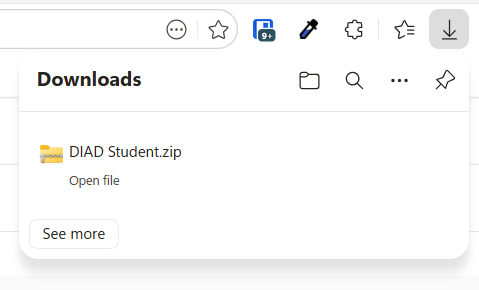
- click the downloaded file. The zip file will open, and show the contents within Windows Explorer. For the Excel courses, there’s a single folder called “Excel training.
- Drag the folder from the panel on the right to the location where you want to store them in the panel on the left. For example, you may wish to store them in Documents or Desktop for the duration of the course, and move them somewhere more permanent at a later date.
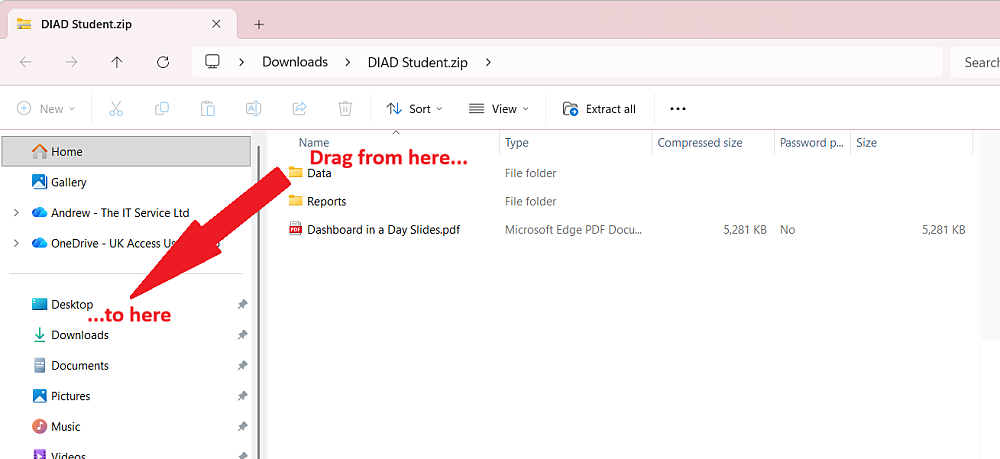
This will unzip the files ready for you to use during the course. Remember where you’ve put them!
Common Functions:
- Review of using absolute references
- IF and nested IF
- SUMIF and COUNTIF
Working with Formulas and functions to improve reliability:
- The formula auditing toolset
- Using data validation
- Validating data with IF and ISERROR functions
- Using IFERROR as an alternative to IF and ISERROR
Advanced use of formulas and other tools:
- Review of VLOOKUP
- Using XLOOKUP instead of VLOOKUP
- Using Excel’s new “spill” functions
- Advanced use of Conditional Formatting
Introduction to PivotTables:
- What are PivotTables
- Creating simple PivotTables
- Adding multiple fields to PivotTables

9 November 2026 at 13:30
Delivered online.
Online sessions include usual breaks. Link(s) are auto-sent from [email protected] a few days in advance of delivery. Full instructions and course handouts will also be sent in advance.
Please note you will be expected to use your camera and display your name on all training. If unable to comply, please ensure the trainer understands why and notes your name and authority for recording attendance.
4 spaces remaining