


Power BI Essentials - Online
Category
Work Processes
Audience
Anyone interested. To attend this session, you must have a reasonable level of general IT literacy and comfort with data. Although no experience of Power BI is necessary, a reasonable familiarity with Excel will be helpful.
Duration
3 hours - To ensure a positive experience for all attendees, delegates may not be admitted to the course if they arrive more than 10 minutes after the start time.
Delegate rate
Approximately £100 per day per delegate. Charges (paid by your authority) depend on how many delegates book.
To ensure a positive experience for all attendees, delegates may not be admitted to the course if they arrive more than 10 minutes after the start time.
IMPORTANT: For the Power BI introduction sessions, BEFORE BOOKING A PLACE, please confirm with your own IT teams that you have authority to download and install Power BI Desktop.
To get a basic overview of the key features of Power BI.
To attend this session, you must:
- have a copy of Power BI Desktop installed and working. The software can be downloaded from here: Download Microsoft Power BI Desktop from Official Microsoft Download Center This is a simple download in theory, but people will need to make sure that they’ve done this ahead of the course, as sometimes IT policies will mean that the download or installation is blocked, or has to be done by an administrator. This is governed by IT policies, and is likely to vary between authorities.
- download a copy of the course files. These can be downloaded from Microsoft – Unzip the course files - Training | Microsoft Learn It’s important that you have unzipped / extracted the files to a location such as your Desktop or your Documents folder ahead of the training. Be aware also that this is a large download – the zipped file is just under 500mb.
To extract downloaded files: Note that the screenshots below were taken on Microsoft Edge. If you are using Chrome or a different browser, the appearance will be slightly different but the steps remain the same.
The files will download as a .zip file. If you cannot see the “Downloads” window within the browser, press CTRL-J to show this:
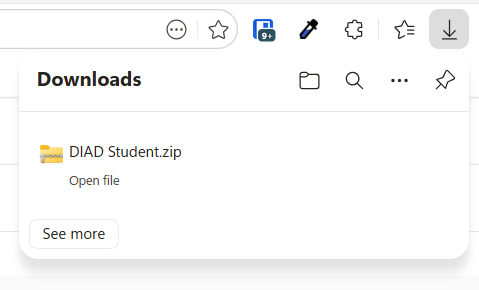
- click the downloaded file (in this example, we’re downloading the Power BI files). The zip file will open, and show the contents within Windows Explorer. For Power BI, there’s a PDF and two folders (Data and Reports).
- Drag the folder from the panel on the right to the location where you want to store them in the panel on the left. For example, you may wish to store them in Documents or Desktop for the duration of the course, and move them somewhere more permanent at a later date.
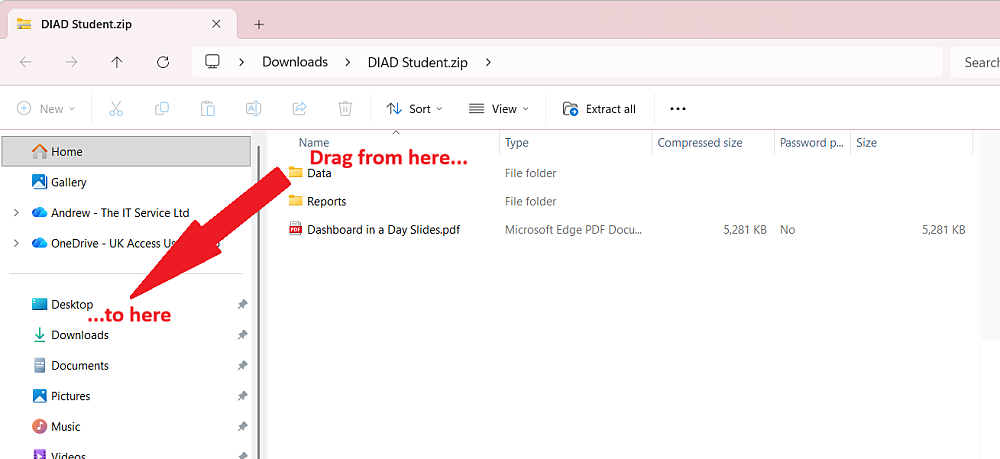
This will unzip the files ready for you to use during the course. Remember where you’ve put them!
Note: for the Power BI course, we will only actually use the “Data” folder.
- What is Power BI?
- Getting data into Power BI
- Cleaning and transforming your data
- Creating reports and adding visualisations
- Putting it all together to build a dashboard
- Publishing your report to a Workspace
